
- Documentation
DiveWP documentation
How to install, set up and use DiveWP 3.0: requirements, diagnostics, the AI Agent, plugin management, logs, scheduled tasks, email reports, abilities and MCP.
- Version 3.0.0
- WordPress 6.0+ · PHP 7.4+
- Tested up to WordPress 7.1
Overview
DiveWP is a free WordPress AI assistant and site health toolkit for evidence-based troubleshooting. It covers logs, scheduled tasks, hosting tests, performance, security, database health, plugins, WooCommerce, SEO, email, server settings, themes and administrator activity, and explains every result in plain English.
Version 3.0 adds the opt-in DiveWP AI Agent, expanded plugin management with rollback, and optional site-health email reports. Standard diagnostics never use an AI provider, and DiveWP recommends changes instead of silently making them.
DiveWP is licensed GPLv2 or later and distributed through the WordPress.org plugin directory.
wp-admin › DiveWP › Dashboard
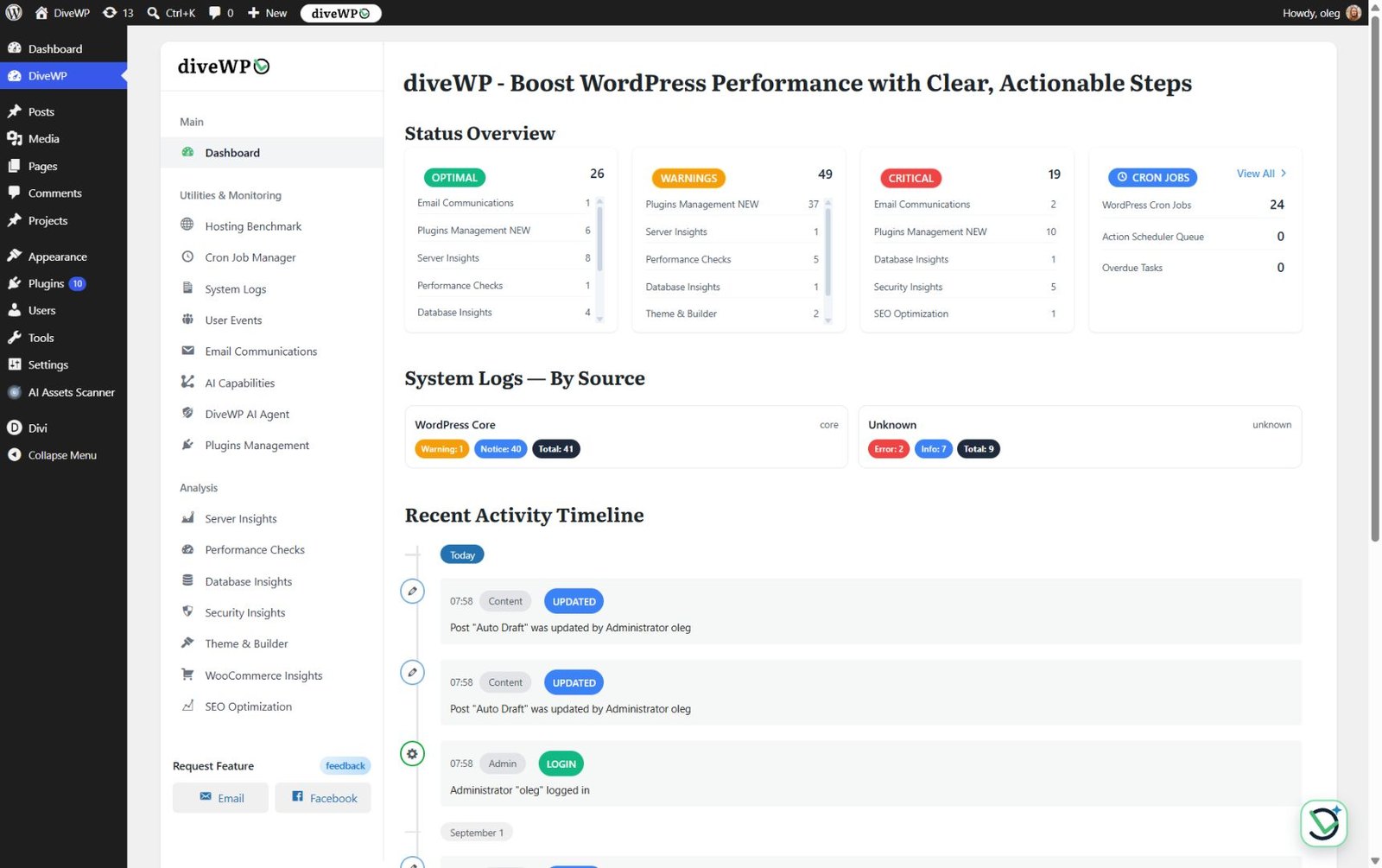
The DiveWP dashboard with diagnostic totals, scheduled tasks, log sources and recent activity.
Requirements
- Standard (non-AI) tools: WordPress 6.0 or newer and PHP 7.4 or newer.
- Abilities API integrations: WordPress 6.9 or newer.
- AI Agent chat: WordPress 7.0 or newer, the WordPress AI Client, and a compatible text-generation provider in Settings > Connectors. Provider terms and charges apply.
- Tested up to: WordPress 7.1. Current version: 3.0.0.
- Access: a WordPress user with the
manage_optionscapability (administrators). - WooCommerce: optional. Its checks and log sources appear only when the relevant components are available.
On WordPress versions older than 7.0, the AI Agent launcher shows update instructions, while all non-AI tools keep working.
Installation
- In WordPress, go to Plugins > Add New.
- Search for DiveWP and select Install Now.
- Activate the plugin.
- Open DiveWP from the WordPress admin menu.
- For the AI Agent on WordPress 7.0+, configure a compatible provider in Settings > Connectors, then review and accept the AI Agent notice.
Manual installation
Download the ZIP from the DiveWP plugin page on WordPress.org, upload it through Plugins > Add New > Upload Plugin, activate it and open DiveWP.
Updating from an earlier version
Already using DiveWP? Update it from your Plugins screen like any other plugin. The AI Agent stays opt-in: it needs a configured provider and your acceptance of the AI Agent notice.
Uninstalling
Deleting DiveWP from the Plugins screen runs its uninstall routine. It removes the plugin's email log, user events, benchmark results and AI Agent conversation and message tables, together with its options, transients, user settings and scheduled events.
Dashboard
The DiveWP dashboard summarises diagnostic status, plugin updates, cron totals, overdue tasks, recent activity and logs by source, so you can see where to look first.
Diagnostics
Diagnostics are read-only. Each check tells you what it found, why it matters and what to do next.
Server configuration
Checks PHP and database versions, memory, execution time, post and upload limits, input variables, PHP extensions and WordPress.org connections, with plain-language recommendations.
Performance
Detects page caching, CSS and JavaScript minification, deferred JavaScript, image optimization, lazy loading and persistent object-cache configurations, with guidance when manual confirmation is needed.
Database health
Inspects database size, table overhead, post revisions, spam comments, expired transients and non-core tables. DiveWP recommends cleanup but does not perform it automatically. Always back up first.
Security
Audits HTTPS, file permissions, the default admin username, the database prefix, the file editor, debug mode and security plugins. These are configuration checks, not malware scanning or a firewall.
Theme and page builders
Checks the active theme version, child theme, translation readiness, inactive themes, page builders and translation plugins, without changing your design.
WooCommerce
When WooCommerce is active, checks cart fragments, session handling, old order volume and product revisions. DiveWP gives recommendations without changing store data.
SEO configuration
Reviews SEO plugins, the homepage meta description, the XML sitemap, robots.txt, permalinks and search visibility. DiveWP identifies configuration gaps; it does not promise rankings or rewrite content.
Email log and SMTP checks
Detects supported SMTP plugins and email-authentication indicators, checks wp_mail() and sends a rate-limited test. The email log records sent and failed status, subject, time, initiator and errors, with refresh and delete controls.
Hosting benchmark
Benchmarks database operations, CPU, memory, file I/O, network checks, concurrent requests and WooCommerce-style price, shipping and inventory calculations. Review scores, previous runs, details and the hosting guide.
User activity log
Records administrator logins, failed logins, content, media, comments, users, roles, plugins, themes, settings, core updates, file edits and Application Password REST access. Events include details and pagination, administrators can clear the log, and the default retention is 30 days.
AI Agent
DiveWP AI Agent lets administrators ask questions about the current site. It answers from DiveWP's read-only diagnostics and optional page context, without a separate investigation scan.
Set up the AI Agent
- Run WordPress 7.0 or newer with the WordPress AI Client.
- Configure a compatible text-generation provider in Settings > Connectors.
- Review and accept the AI Agent notice.
The AI Agent is opt-in, and each feature can be disabled. Review your provider's privacy policy, terms and billing before you turn it on. For free local AI, the chat settings include a guide to AI Provider for Ollama, a community connector for the WordPress AI Client; a local Ollama setup does not need an API key.
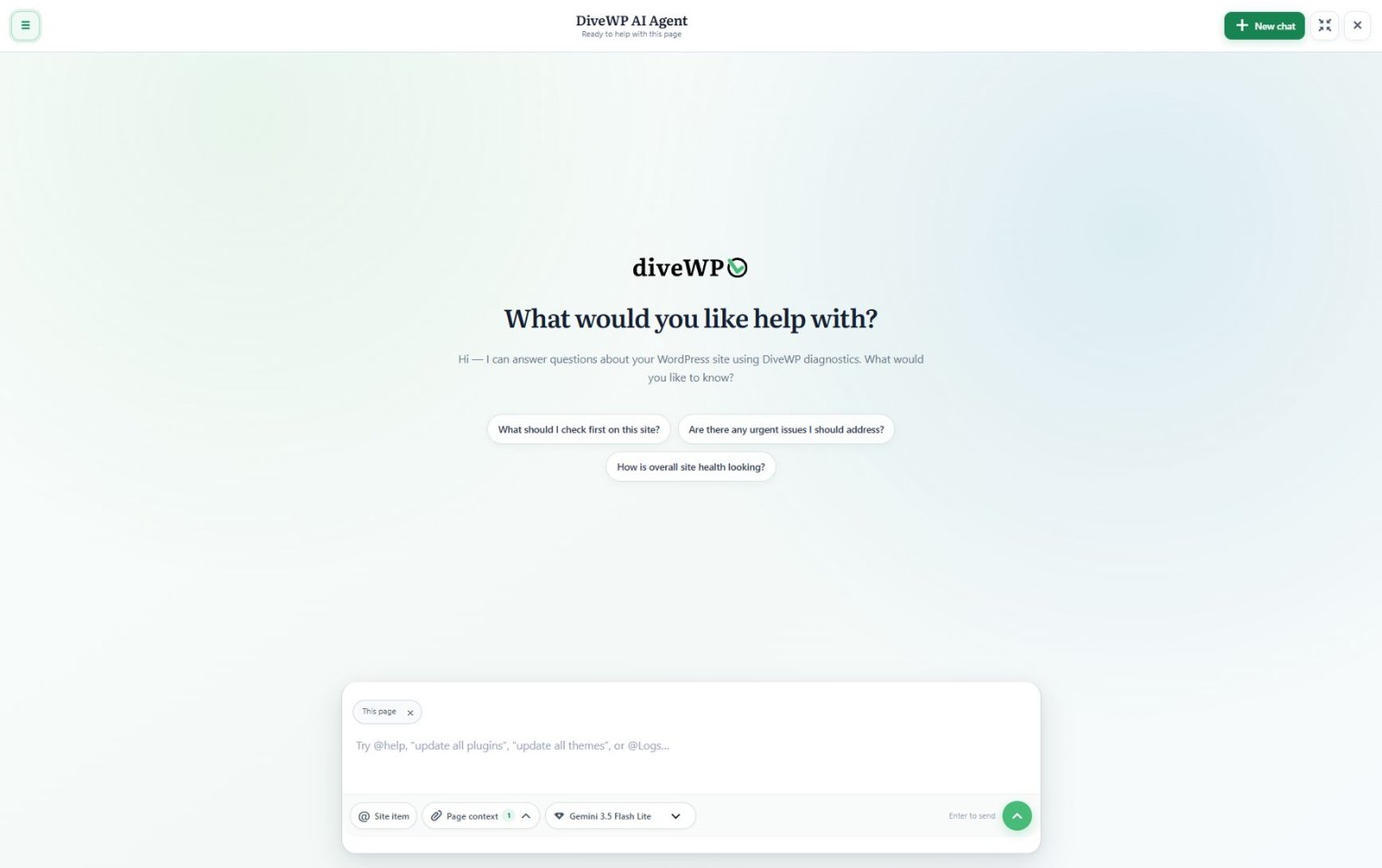
The AI Agent chat workspace with suggested WordPress questions and page context.
What the AI Agent can do
- Chat anywhere in wp-admin: a resizable chat across wp-admin and, after consent, the logged-in frontend, with streaming answers, model selection, and answer style and length controls.
- @ mentions: type @ to point the chat at a specific plugin, theme, update or DiveWP log, so it uses the relevant evidence.
- Context Lens: bounded evidence from the current screen, such as browser errors, failed-request summaries, selected elements and short reproduction traces, with sensitive data redacted.
- Public research and case handoff: optional public WordPress research and a redacted case handoff for support, keeping private site data out of public search queries.
- Read Aloud: browser-based Read Aloud with adjustable speed.
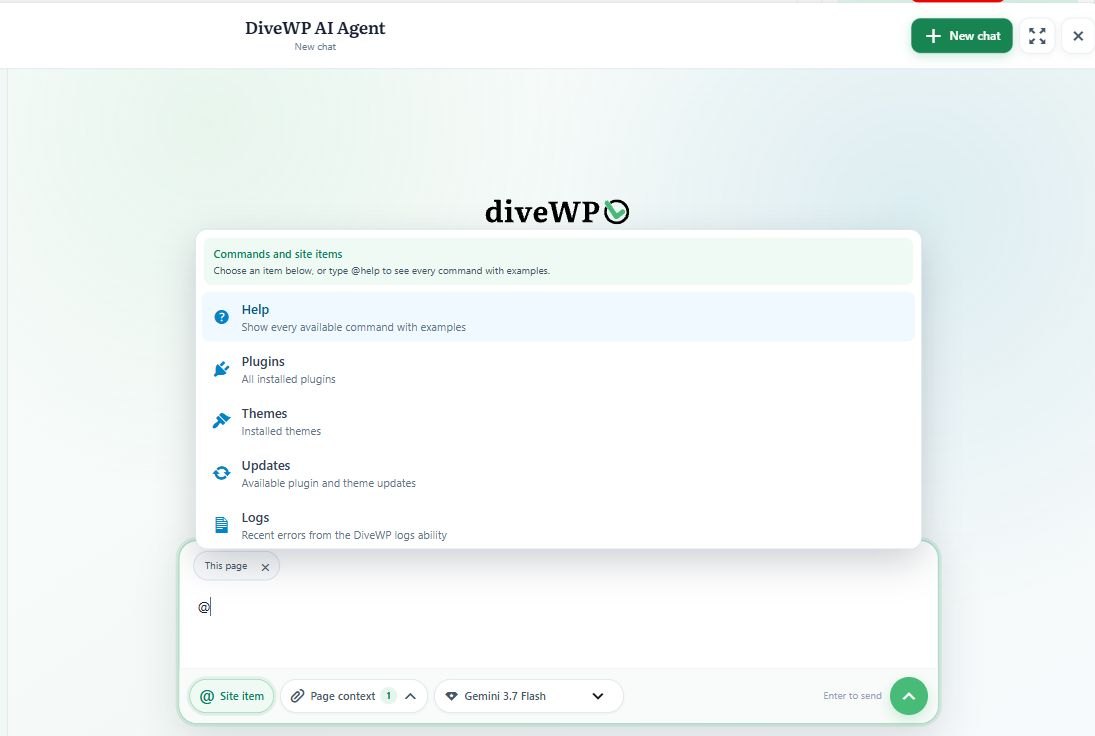
The @ mention picker for plugins, themes, updates and logs, with page context attached.
Conversation history
Conversations belong to the administrator who started them. You can search, rename, archive, restore, delete and export them, and configure retention (90 days by default). Raw context snapshots are not saved with conversation history.
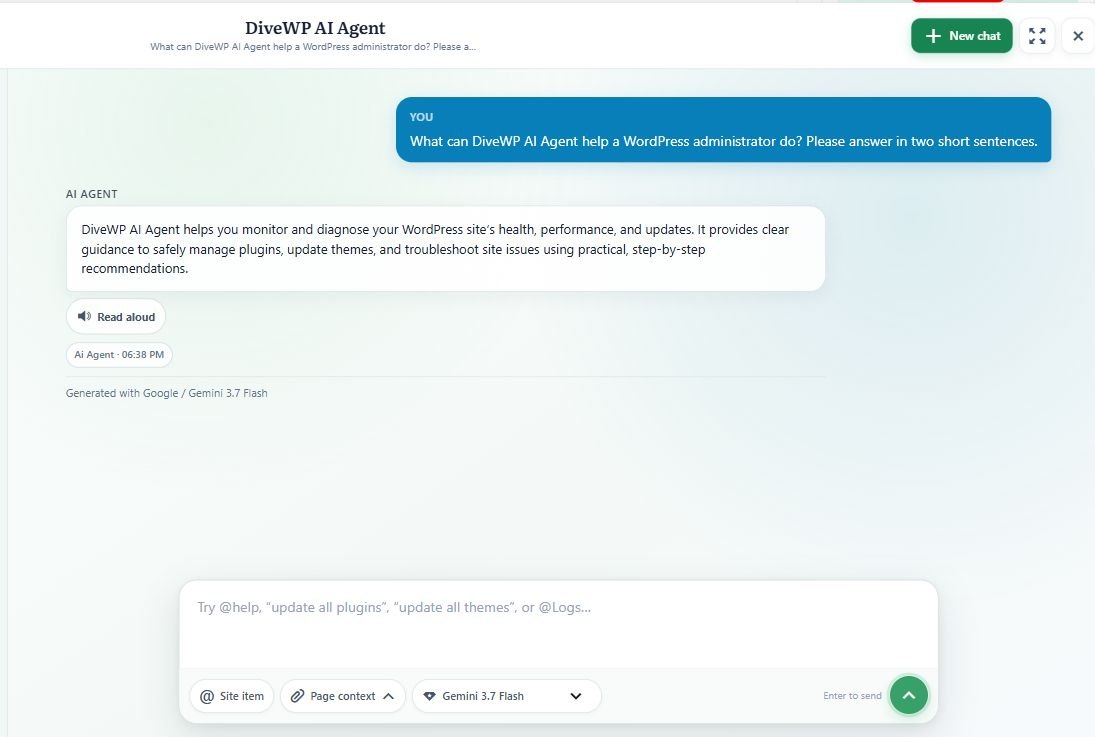
A saved AI Agent conversation with a Read Aloud control.
Maintenance from chat: approval and automatic mode
The AI Agent can carry out verified plugin and theme maintenance: single and update-all plugin updates, single and update-all theme updates, combined plugin-and-theme updates, plugin activation and deactivation, and theme activation. Update requests show live per-item progress.
- Approval mode (default): nothing runs until you click the approval button.
- Automatic mode (optional, per user): skips only that click. It still requires an explicit @ target and an action request, rechecks permissions and current state, verifies the result and keeps audit logging.
Diagnostics and log mentions stay read-only. Take a fresh backup before a big batch of updates.
Plugin manager, updates and rollback
Plugins Management lets you search and filter installed plugins by active, inactive or update status, read WordPress.org descriptions, changelogs, reviews, ratings and versions, and activate, deactivate, update or roll back eligible plugins.
DiveWP › Plugins Management
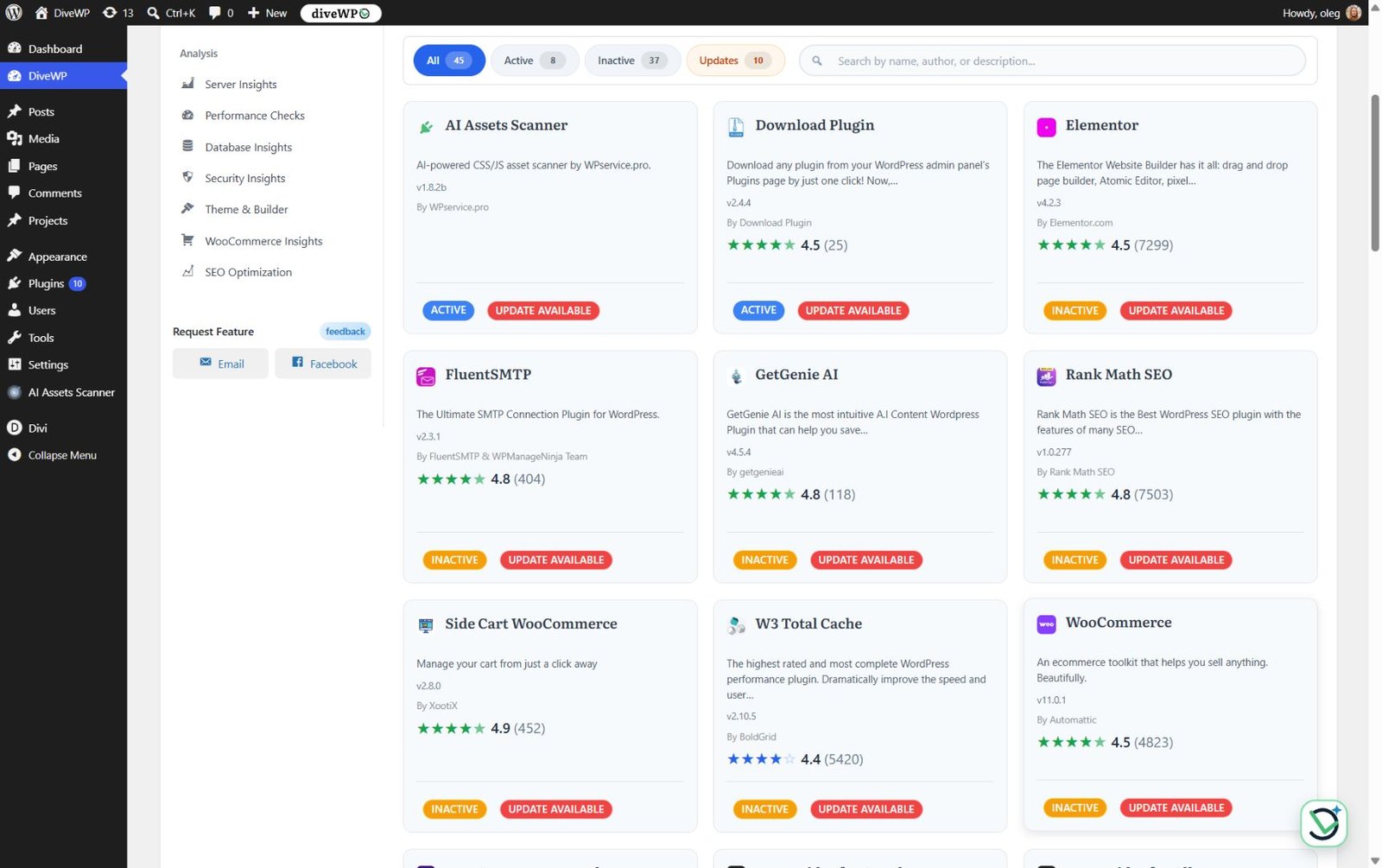
Plugins Management with versions, status, ratings and available updates.
Roll back a plugin
Open the plugin's details, go to the Versions tab, pick an earlier version and install it. Rollback is available for eligible plugins and replaces files only, not database changes or options. A backup is still your safety net, especially for plugins that change data during an update.
Plugin Details › Versions
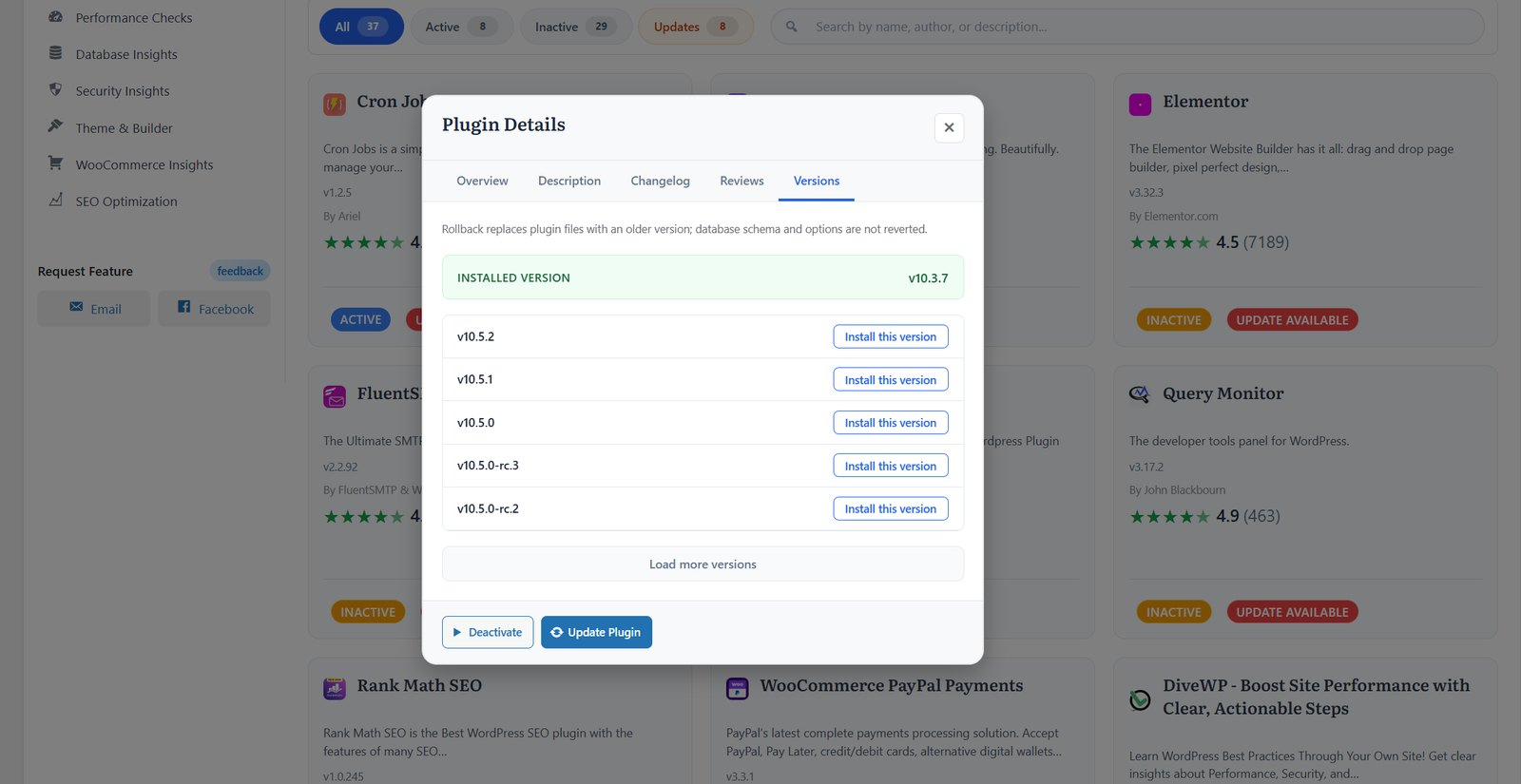
Plugin version history and rollback.
System logs
System Logs reads wp-content/debug.log, WooCommerce file and database logs, and WooCommerce fatal errors when available. Use the Latest, By Source, WP Debug, WooCommerce, Fatal Errors and access-help views, with severity labels, source detection, adjustable limits, entry details, stack context and copy controls.
DiveWP › System Logs
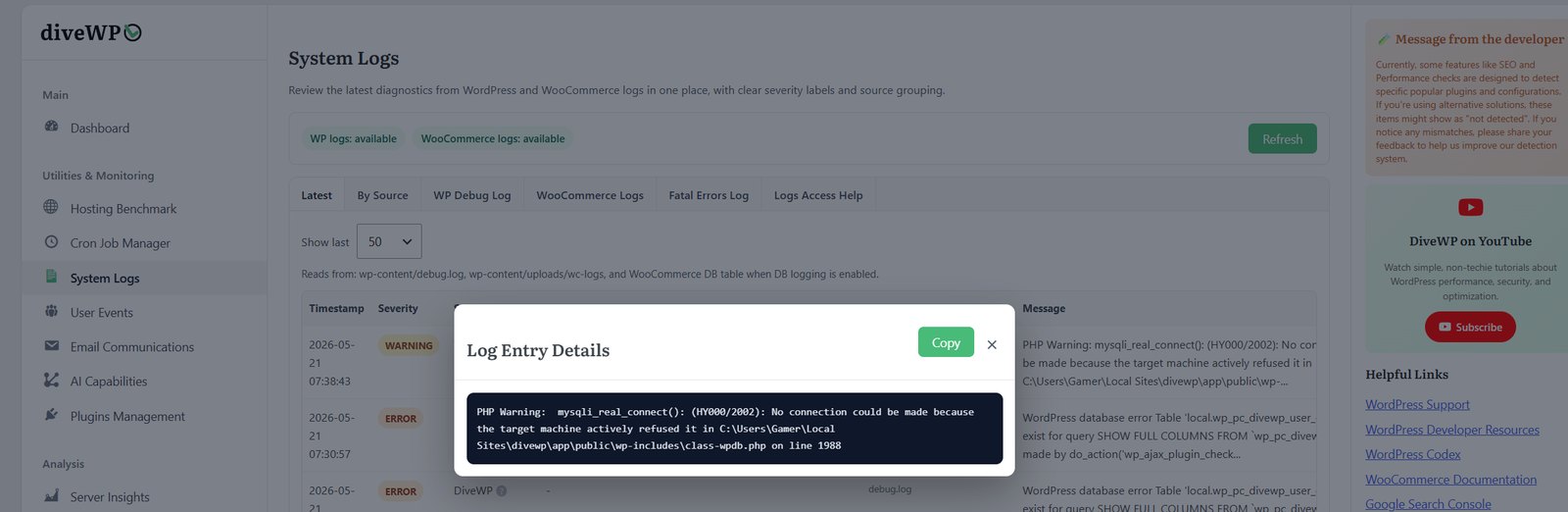
System log details with a copy control.
Cron jobs
The Cron Job Manager monitors WP-Cron events and Action Scheduler queues. Search tasks, review recurrence and source, find overdue jobs and potential orphan hooks, and inspect execution status, duration, peak memory, trigger source and errors.
Email reports
After you accept the AI Agent notice, DiveWP can send an optional, DiveWP-branded HTML site-health report built from its existing diagnostics. Your site sends it to the email address set in the AI Agent settings, every 30 days by default. Administrators can choose 7, 90 or 365 days, or turn the report off.
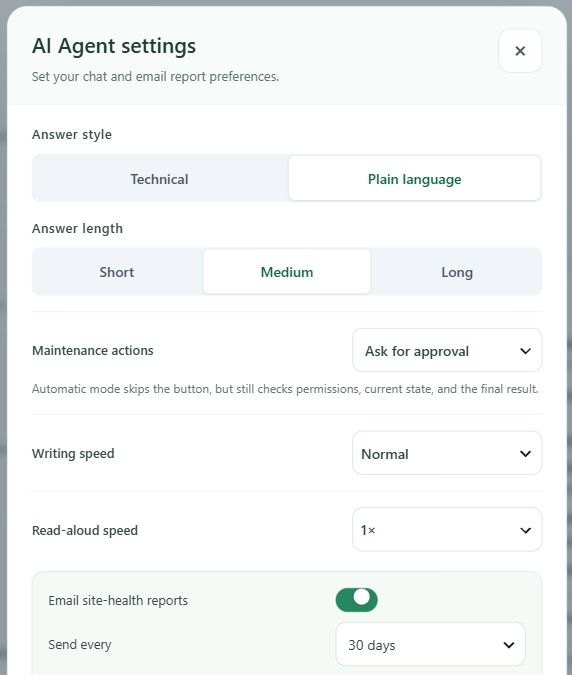
AI Agent settings with answer preferences, Read Aloud speed and the email report interval.
Abilities API and MCP
On WordPress 6.9 and newer, DiveWP exposes 14 canonical abilities through WordPress REST and MCP integrations. They cover server, performance, database, security, theme, WooCommerce, SEO, email, hosting, cron, plugins, logs, User Events and AI Agent reports. The setup screen walks you through the Abilities API, the MCP adapter, Application Passwords and client configuration.
DiveWP › MCP Integration
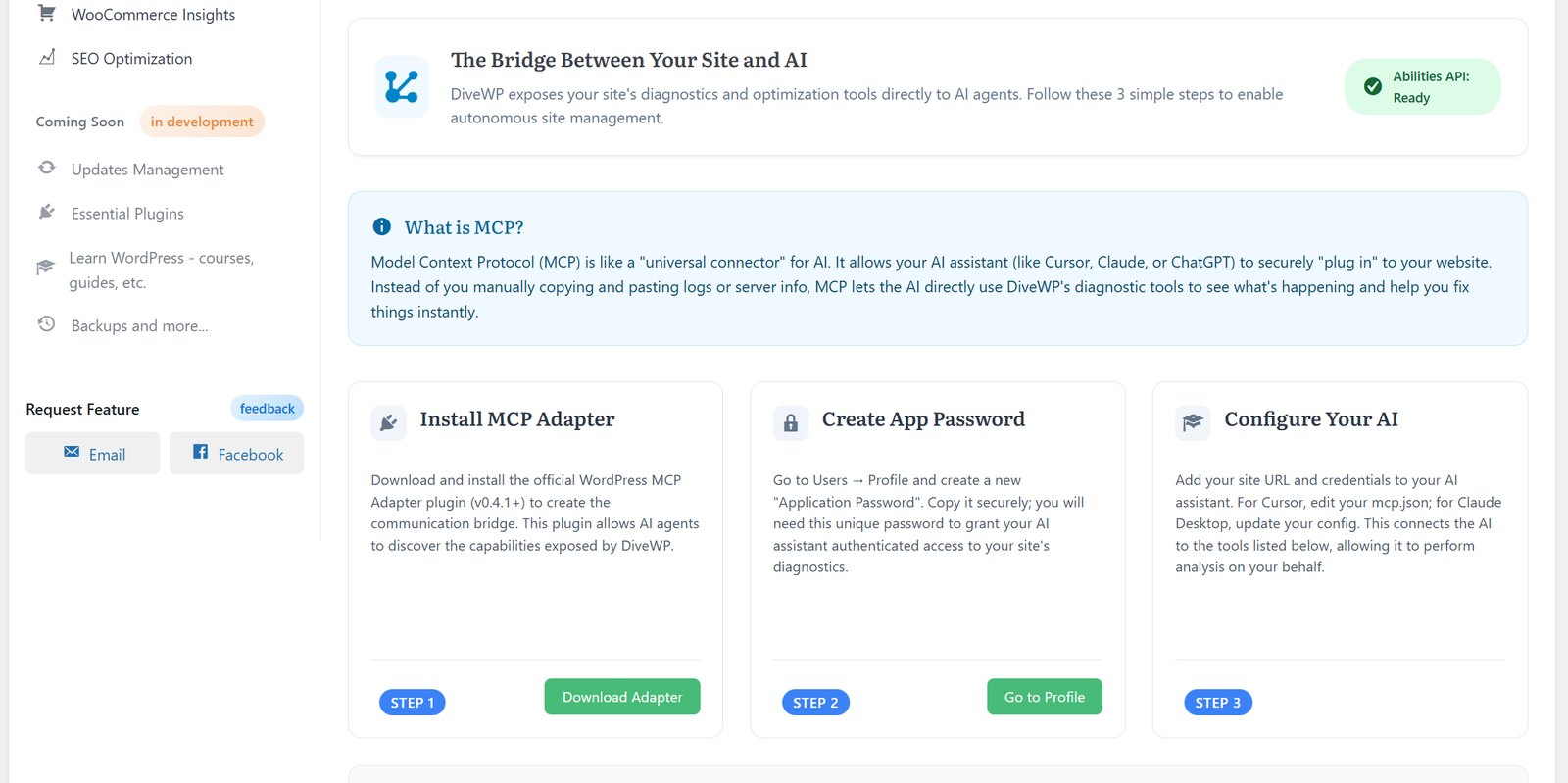
Abilities API and MCP setup.
Privacy and data
- Standard diagnostics run on your server and do not use an AI provider.
- The AI Agent is opt-in and sends generation requests through the provider configured in Settings > Connectors. Public research may query approved WordPress.org documentation.
- DiveWP bounds evidence and redacts common credentials, salts, database values, authorization data, cookies, sessions, email and IP addresses, paths and URL queries. It does not read passwords, form values, browser storage, network bodies or cross-origin iframe content.
- Conversations are isolated by site and administrator, default to 90-day retention and support the WordPress privacy tools.
- DiveWP stores its data in your WordPress database, in tables such as
{prefix}divewp_email_log,{prefix}divewp_user_events,{prefix}divewp_cron_logs,{prefix}divewp_benchmark_results,{prefix}divewp_ai_doctor_conversationsand{prefix}divewp_ai_doctor_messages. All tables use your database's charset and collation. - The hosting benchmark's network and concurrency tests send simple requests to public test endpoints (httpbin.org, jsonplaceholder.typicode.com and api.github.com).
For how divewp.com itself handles personal data, see the Privacy Policy.
Troubleshooting
The AI Agent shows update instructions instead of a chat
AI Agent chat needs WordPress 7.0 or newer. Update WordPress; all non-AI tools keep working in the meantime.
The AI Agent does not answer
Check that a compatible text-generation provider is configured in Settings > Connectors and that you have accepted the AI Agent notice. The AI Agent does not work without an AI connector.
Abilities or MCP tools are missing
Abilities API integrations need WordPress 6.9 or newer. Follow the setup screen for the MCP adapter, Application Passwords and client configuration.
System Logs shows no WordPress debug entries
System Logs reads wp-content/debug.log. WordPress writes that file only when debug logging is enabled with the WP_DEBUG and WP_DEBUG_LOG constants in your WordPress configuration file. WooCommerce log sources appear only when WooCommerce is available.
A plugin update broke something
In Plugins Management, roll back the plugin to an earlier version from its Versions tab, if it is eligible. Rollback replaces files only, not database changes or options, so restore a backup if the update changed data.
Email reports or test emails do not arrive
Check that the AI Agent notice is accepted and that the email report is not turned off in the AI Agent settings. Then run the email checks: they detect SMTP plugins and email-authentication indicators, check wp_mail(), send a test and show sent and failed messages in the email log.
Scheduled tasks run late
Open the Cron Job Manager to find overdue jobs and potential orphan hooks, and inspect each run's status, duration, peak memory, trigger source and errors.
Still stuck?
Ask on the DiveWP support forum or contact us. The AI Agent can prepare a redacted case handoff to share with support.
Changelog
3.0.0
- Added the opt-in DiveWP AI Agent for conversational help grounded in existing site diagnostics and current-page context; no separate investigation scan is needed to answer site-health questions.
- Added a resizable chat workspace across wp-admin and the logged-in frontend, with streaming responses, model selection, answer style and length controls, and clear setup guidance for supported AI providers.
- Added Context Lens for bounded page evidence, browser errors, failed-request summaries, selected elements and short reproduction traces, with user controls and sensitive-data redaction.
- Added administrator-owned conversation history with search, rename, archive, restore, delete, export, configurable retention and WordPress privacy-tool support.
- Added browser-based Read Aloud with adjustable speed and improved chat accessibility, responsive layout, settings modal and branded confirmation dialogs.
- Added structured @ mentions for plugins, themes, updates and DiveWP logs, so chat can identify specific site items and use relevant diagnostic evidence.
- Added optional public WordPress research and redacted diagnostic handoff while keeping private site data out of public search queries.
- Added verified plugin and theme maintenance from chat, including individual and bulk updates, plugin activation and deactivation, and theme activation. Per-user Approval mode is the default; optional Automatic mode retains permission, current-state, result-verification and audit checks.
- Added live per-item progress for plugin-wide, theme-wide and combined update requests.
- Added an optional DiveWP-branded HTML site-health email report based on existing diagnostics, enabled after AI Agent consent and scheduled every 30 days by default. Administrators can turn it off or choose 7, 90 or 365 days.
- Expanded Plugins Management with WordPress.org ratings, reviews, version history, updates and guarded rollback for eligible plugins.
- Exposed the expanded set of DiveWP abilities through WordPress REST and MCP integrations, and improved System Logs loading.
- Improved dashboard diagnostic totals, scheduled-task and log summaries, chat reliability and provider compatibility.
- Tested with WordPress 7.1; standard non-AI tools remain available on WordPress 6.0+, while AI chat requires WordPress 7.0+ and a compatible AI setup.
Read the full release story in The Free WordPress AI Agent: How DiveWP 3 Diagnoses and Maintains Your Site.
License and support
- License: GPLv2 or later (GNU General Public License v2).
- All code, including included libraries and assets, is GPL-compatible.
- Source code is human-readable, with no code obfuscation or hidden functionality.
- Updates are delivered through WordPress.org.
- Support: the WordPress.org support forum, the contact page or info@divewp.com.
- FAQ
Frequently asked questions
Can't find your answer? Ask on the support forum or get in touch.
Do I need technical knowledge?
Not at all. DiveWP explains everything in plain English and guides you through each step.
Is WooCommerce required?
No. WooCommerce checks and log sources appear only when WooCommerce is active.
Will this modify my site settings?
Diagnostics are read-only. DiveWP changes your site only when you ask: plugin activation, updates and rollback in Plugins Management, or plugin and theme updates from AI Agent chat. Approval mode is the default, and each change is permission-checked, verified and logged.
Will this plugin slow down my site?
Most analysis runs in wp-admin. Activity, email and cron monitoring, log retention and optional AI features use WordPress hooks only when they are active.
Does the AI Agent work without an AI connector?
No. Configure a compatible text-generation provider under Settings > Connectors. Provider terms and charges apply. All non-AI tools keep working without one.
What happens on an older WordPress version?
Standard tools support WordPress 6.0+. On versions before 7.0, the AI Agent shows an update guide instead of chat.
Is DiveWP a caching, security, backup or SEO plugin?
No. DiveWP explains the configuration it detects. It doesn't replace caching, malware scanning, firewall, backup, SMTP delivery or full SEO tools.